GAA Camogie Workflow

Camogie analysis that keeps shape, pressure, and scores in the same live picture.

Touchline IQ gives camogie coaches a structured matchday flow that starts with formation context, moves into live event capture, and finishes with a cleaner post-match review.

The page mirrors the live product: 57 seeded camogie actions, dedicated outfield and goalkeeper skill catalogs, 15-a-side rules, and the same goals-plus-points score model coaches expect to see in a G-PP display.

57 seeded actions

Camogie-specific capture across puckouts, contests, defensive pressure, wides, assists, and scoring events.

30 + 28 skills

Separate outfield and goalkeeper catalogs grouped into the same coaching categories used in-app.

Puckouts, hooks, and blocks

The workflow reflects the camogie actions that shape territory, pressure, and scoring chances.

Formation view
Camogie formation screen showing players positioned across the pitch before the live match begins.
Camogie setup starts with a clear on-pitch shape instead of a loose list of names and positions.

Action Catalog

Track the camogie actions that shape puckouts, pressure, and scores.

The camogie catalog keeps the page tied to real product vocabulary. Coaches can review puckouts, hooks, blocks, ruck balls, wides, assists, and scoring events in the same language used during the game.

The current catalog surfaces 57 seeded actions across the live workflow, which is why the page is organized by real product categories rather than a shorter marketing-only summary.

Puckouts

12 actions
Own Puckout Won (Long)Own Puckout Won (Short)Opp Puckout Won (Long)Opp Puckout Won (Short)Own Puckout WonOpp Puckout WonOwn Puckout Lost (Long)Own Puckout Lost (Short)Opp Puckout Lost (Long)Opp Puckout Lost (Short)Own Puckout LostOpp Puckout Lost

Defensive

6 actions
Opp Shot SavedTackle MadeBlockHookHook / BlockBlocked Down

Possession

4 actions
Turnover WonTackle BrokenTurnover LostPossession Lost

Contests

6 actions
Breaking Ball WonRuck Ball Won50:50 Ball WonBreaking Ball LostRuck Ball Lost50:50 Ball Lost

Discipline

2 actions
Free WonFree Conceded

Passing

8 actions
Pass (Short)Pass (Long)Creative PassCreative Pass (Short)Creative Pass (Long)Failed Pass (Short)Failed Pass (Long)Failed Pass

Scoring

12 actions
Point Scored (Play)Point Scored (Free)Point ScoredGoal Scored (Play)Goal Scored (Free)Goal ScoredPoint Conceded (Play)Point Conceded (Free)Point ConcededGoal Conceded (Play)Goal Conceded (Free)Goal Conceded

Assists

2 actions
Goal AssistPoint Assist

Shooting

5 actions
Wide (Outside Zone)Wide (Inside Zone)Wide (Play)Wide (Free)Shot Dropped Short

Skill Ratings

Group camogie skill feedback into categories coaches can act on.

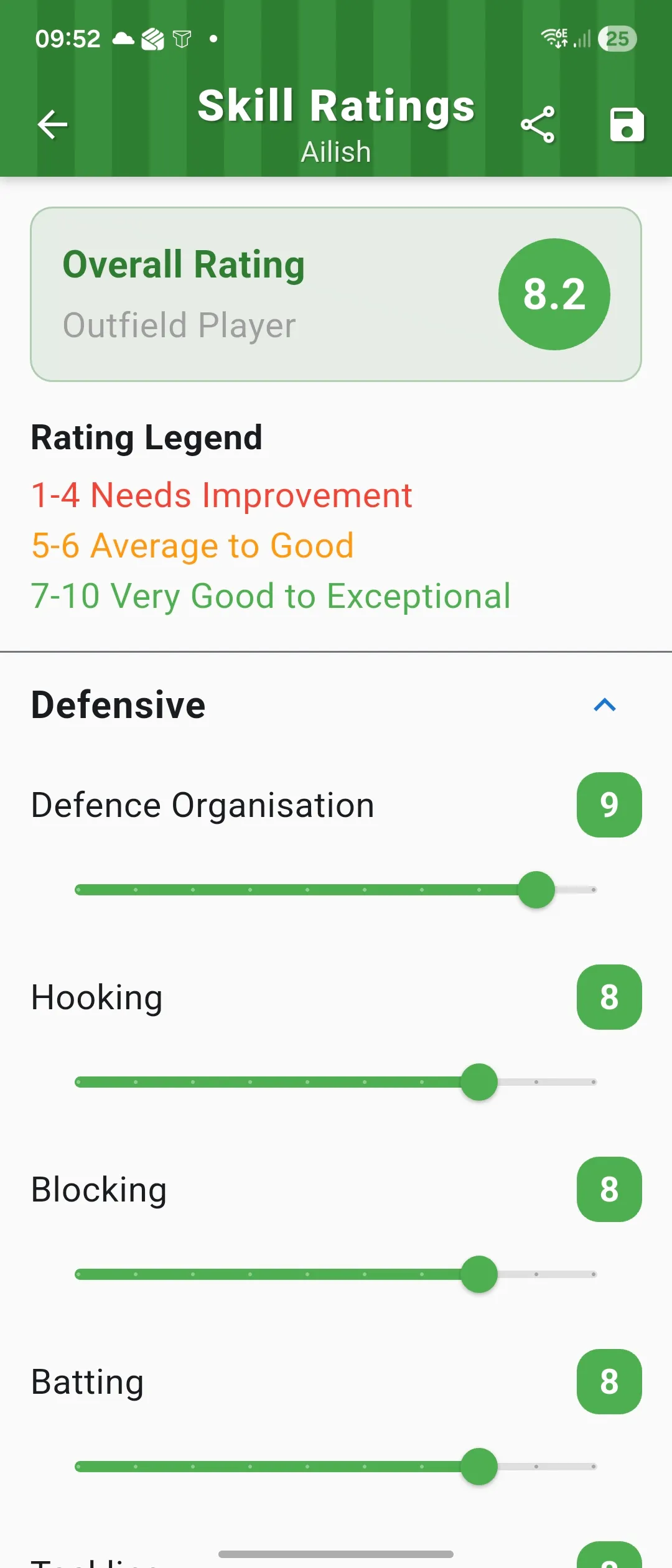
The camogie rating workflow supports separate outfield and goalkeeper catalogs, then groups them into categories that make season-long development conversations easier to structure.

These categories mirror the existing camogie skill categorizer used in-app: Technical, Attacking, Defensive, Physical, Mental, and Goalkeeping where appropriate.

Rating scale 1 to 10
Outfield skills 30
Goalkeeper skills 28
Player skill ratings screen showing grouped categories, an overall score, and individual skill sliders.
The rating workflow keeps camogie player feedback specific without adding another disconnected admin tool.

Outfield players

30 skills

Physical

PhysicalityAgilitySpeedStamina

Defensive

Defence OrganisationHookingBlockingBattingTacklingMarking

Technical

First TouchCatchingShort Pass LeftShort Pass RightLong Pass LeftLong Pass RightHand Pass RightHand Pass LeftPossession RetentionSoloPick Up

Mental

Game ReadingTemperamentWorkrateVision

Attacking

Free TakingSideline CutLeft Hand Shooting AccuracyRight Hand Shooting AccuracyGoal Finishing Accuracy

Goalkeepers

28 skills

Physical

PhysicalityAgilitySpeedStamina

Defensive

Defence OrganisationHookingBlockingBattingTackling

Technical

First TouchCatchingShort Pass LeftShort Pass RightLong Pass LeftLong Pass RightHand Pass RightHand Pass LeftPossession RetentionSoloPick Up

Mental

Game ReadingTemperamentWorkrateVision

Goalkeeping

Puck Out LongPuck Out ShortShot-Stopping

Attacking

Free Taking

Scoring System

Keep the camogie scoreline clear: goals and points together.

Touchline IQ reflects camogie scoring the way coaches already discuss it, with goals and points held separately while the review still shows the restarts, contests, and chances behind the total.

  • Point scores and goals stay distinct, then roll into the familiar G-PP display coaches expect to read after the match.
  • Puckouts, hooks, blocks, turnovers, assists, and wides stay visible beside the scoreline so the review explains how momentum moved.
  • The workflow is built around a 15-player camogie shape and the restart battles that often dictate territory and scoring pressure.
Primary score Goals + points
Players per side 15
Review context Puckouts, hooks, blocks, wides

Match Flow

Work through a five-step camogie workflow that stays useful on the sideline.

The camogie page shows a practical sequence from team preparation into live capture and out into a review coaches can use once the whistle goes.

This walkthrough is intentionally sequential: 5 screens that mirror the coaching workflow from setup to post-match output.

01

Open Team Hub

Start from the team-management view so the squad context, player list, and matchday prep all stay connected before throw-in.

Team players screen listing the squad for the selected team.
The workflow starts with a clean team hub instead of scrambling between separate lists and notes.
02

Set Formation

Lay out the shape on the pitch before the match starts so roles and spacing are already clear to the staff.

Gaelic games formation editor showing an empty tactical pitch before players are assigned.
Formation setup turns a squad into a visible camogie shape before the live workflow begins.
03

Confirm Shape

Review the team on the pitch before the live match begins so the sideline starts from a shared picture of roles and structure.

Camogie formation screen with players already positioned across the pitch.
The on-pitch view keeps camogie shape visible before the first live events are logged.
04

Log Events

Capture puckouts, hooks, blocks, turnovers, and scores with the same camogie vocabulary the sideline already uses.

Camogie event logging screen showing positive and negative action buttons for camogie-specific events.
Camogie-specific live logging keeps the whole staff on the same shared match picture.
05

Review Trends

Turn the live match into a cleaner review of involvement, attacking impact, and the events behind the scoreline.

Analysis summary screen with cards for game involvement and attacking impact.
The review step makes camogie scores, contests, and player impact easier to explain after the match.

Start Coaching GAA Camogie with Touchline IQ

Bring camogie setup, live logging, and review into one sideline workflow.

Use one platform for puckout tracking, live event capture, player development, and post-match review instead of trying to piece the story together from notes, memory, and disconnected clips.

Action catalog 57 seeded camogie actions
Matchday flow 5 steps from setup to review
Scoring model Goals and points with G-PP display